
Overview
A jailed user is a user that logins into a FTP server and can only access files and folders within a designated location. Other folders on the server are isolated from this user and, therefore, inaccessible.
Jailing an existing user
- Login to the control panel
- Visit User > Manage Users.
- Select the user to jail, click the Edit action under the Actions column
- Under General Service Configuration, enable FTP and Advanced > Jail to home directory
- This will jail a user to its home directory. Click Browse under Custom Home Directory to specify another location to jail
- Click Save Changes
Jailing a new user
- Login to the control panel
- Visit User > Add User.
- Under General Service Configuration, enable FTP and Advanced > Jail to home directory
- This will jail a user to its home directory. Click Browse under Custom Home Directory to specify another location to jail
- Click Add User
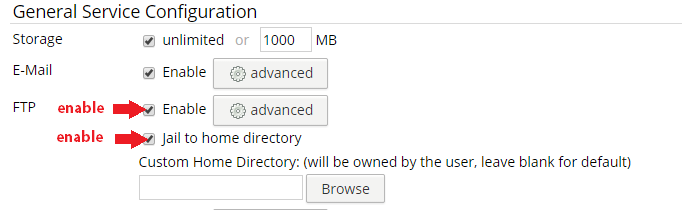
A user configured for jailing